
Close and transfer:
- All certificates in the grace period will be displayed to the user, with options to Close & Transfer.
- When the user selects Close & Transfer, they must choose a deposit account (e.g., savings or checking) to receive the transferred funds.
Below is a sample flow:

All certificates that are currently within their grace period will be displayed to the user. Each certificate in this state will include an option to “Close & Transfer”.
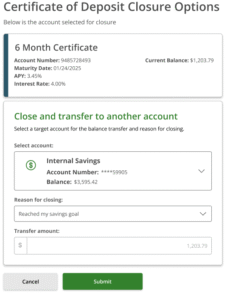
- When the user selects the ‘Close and Transfer’ option, they will be prompted to choose an eligible deposit account (such as a savings or checking account) to receive the transferred funds.
- If the user does not have an existing deposit account, they will be required to create one before proceeding.(Based on FI requirement)
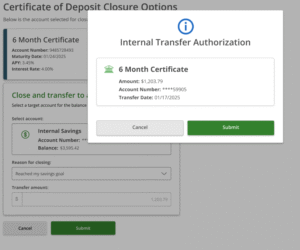
- Once a deposit account is selected, upon clicking Submit, a confirmation pop-up will appear, summarizing the transfer details. This includes the certificate information, the total amount to be transferred (principal plus any accrued interest), and the selected destination account.
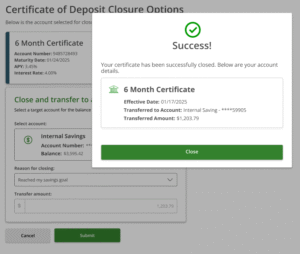
- Upon clicking Submit, the available funds will be transferred from the certificate account to the selected deposit account.
- The certificate account will be closed, and the transfer may be executed immediately or as part of a batch process.