
Sharing or inviting a friend through Text message is available only on mobile.
The following is the sample text message that loads when the user wants to share through the Text message service on the mobile.
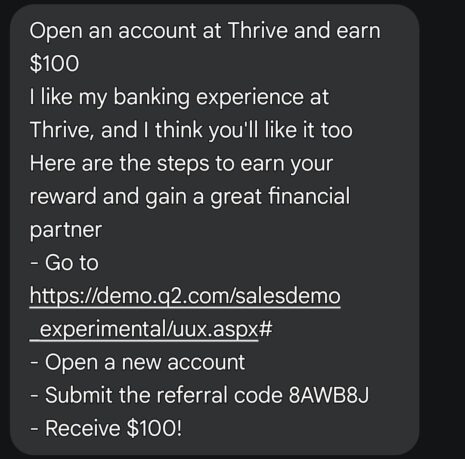
If you want to change the default text message content, you can update it in the Wedge configuration.
In the text message content, we use [referral code] to dynamically display the referral code. Please ensure you use it accordingly.
Note: The Mobile Text Message, Email Template in Mobile, and Social Share Contents in Mobile utilize the same WEDGE_ADDRESS_CONFIGS constants: MOBILE_TEXT_MESSAGE_BEFORE_CODE and MOBILE_TEXT_MESSAGE_AFTER_CODE.
WEDGE_ADDRESS_CONFIGS = {


"MOBILE_TEXT_MESSAGE_BEFORE_CODE": "I like my banking experience at Thrive, and I think you'll like it too.\nHere are the steps to earn your reward and gain a great financial partner:\n- Go to https://online.mymagnifi.org/mymagnifidigitalbanking/test/uux.aspx?#\n- Open a new account\n- Submit the referral code",
"MOBILE_TEXT_MESSAGE_AFTER_CODE": "- Get direct deposits totaling $500 (or more) OR 5 Debit Card Transactions (of any amount) within 60 days of account opening.\n- New member logs into digital banking after the above criteria are met."

}
Or
Please send the updated content to the address below.
Ravi Kallepalli – ravi@nuevesolutions.com, 512 630 0635
Jared Low – jared@nuevesolutions.com, 512 789 5291
Bala Poripireddy – bala@nuevesolutions.com, 512 271 1697